 Quotes
 Invoicing
 Collections
 Recruiter
 Accounts payable
 Order intake
 Bookkeeping
 Scheduling
 Caregiver matching
 Crew dispatch
 Daily summary

The problem
Before a crew can install a job, five things have to happen: the deposit is in, the drawings are approved, the materials are ordered, the customer is ready, and a crew is assigned. The old schedule tracked none of them. The install date was a formula, the signed date plus five weeks, and the spreadsheet’s five-week outlook had nearly every job sitting under “unscheduled”.
The field super could plan a week or two out. Nobody owned weeks three to eight, so engineering couldn’t order materials ahead, and sales couldn’t give a customer an honest date without walking over to ask. The schedule itself lived in three places: a spreadsheet for the crews, a Trello board the installers read on their phones, and an old Access database for every past job.
What we built
- Steps, not guesses. Each job’s deposit, drawings, and materials dates come from the ERP and the email, and its stage is worked out from them in one place, so every screen agrees.
- The five-week look-ahead. Every job in each week it’s worked, and an at-risk strip for any job booked within three weeks with a step still open.
- The crew grid. Every installer and truck for the next three weeks, with shop days and time off. Booking a crew on a job whose drawings aren’t approved shows a large amber warning. It never blocks: the schedule is a plan.
- The map. The week’s jobs, each installer’s home, and their travel range drawn around it. A job outside every ring stands out as an overnight, and the nearest installers are a click away.
- The job card. Everything the crew read on the Trello card, under the same headings, plus the drawings and photos they’re allowed to see. Sales documents never reach the field.
- An app for installers. Today’s job, the week ahead, directions, documents, and photos, on the phone.
- Every past job, searchable. Completed jobs back to the old Access database, searchable by number, customer, name, or address, by everyone.
- Won jobs arrive on their own. A quote won in the quoting tool becomes a job on the board within about 15 minutes, with its contact, scope, and files.

Crew is booked on a job whose drawings aren’t approved
The install shouldn’t start until they’re approved. Sales is chasing the customer.
JB-1215 Northfield Grocery, store 12 · first crew day Mon, Oct 26 · Tyler, Ray, Truck 1 · Drawings sent Sep 11, waiting on the customer · Salesperson Priya Shah
This Week
Oct 12 – Oct 18
Week 2
Oct 19 – Oct 25
Week 3
Oct 26 – Nov 1
10/12
10/13
10/14
10/15
10/16
10/17
10/18
10/19
10/20
10/21
10/22
10/23
10/24
10/25
10/26
10/27
10/28
10/29
10/30
10/31
11/1
Then the AI agents
Once the schedule lived in one place, we added AI agents. They read the scheduling email and file each message on its job, and they check the schedule against concrete rules and guidelines: a crew booked twice, a pairing rule broken, a job too far for its crew, a step still open close to the install. When something looks wrong, they flag it and lay out what they found.
They’re advisory. The company chose to have a person make every scheduling decision, so the agents inform the decision and never make it.
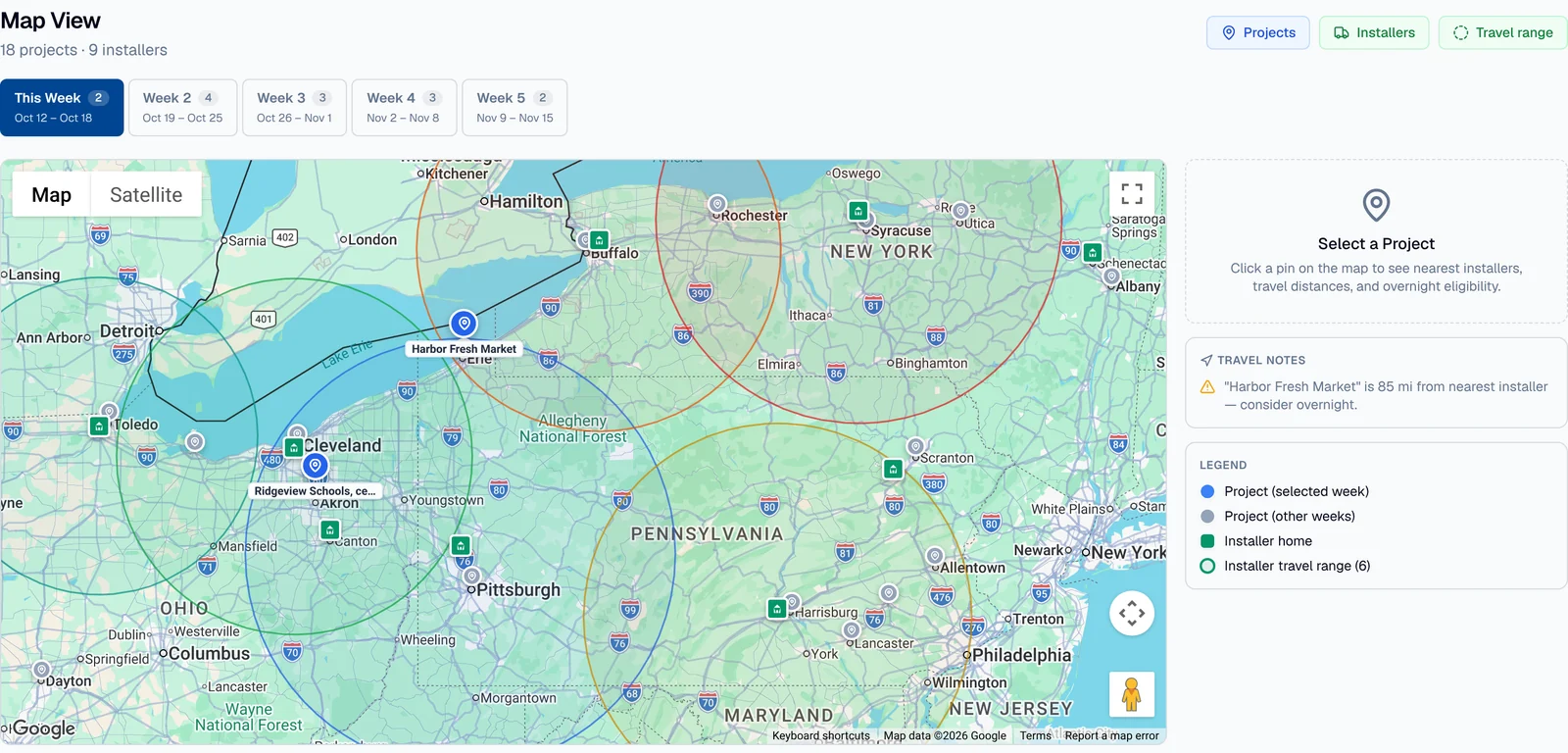
Map View
18 projects · 9 installers
Select a Project
Click a pin on the map to see nearest installers, travel distances, and overnight eligibility.
Travel notes
⚠“Harbor Fresh Market” is 85 mi from nearest installer — consider overnight.
Travel notes
⚠“Harbor Fresh Market” is 85 mi from nearest installer — consider overnight.
Travel notes
⚠“Maple Street Bakery” is 86 mi from nearest installer — consider overnight.
⚠“Westgate Foods warehouse” is 127 mi from nearest installer — consider overnight.
Legend
- Project (selected week)
- Project (other weeks)
- Installer home
- Installer travel range (6)
What changed
What used to live in people’s heads is in one platform: every job’s steps, every crew’s weeks, and every installer’s range. It runs 50 to 100 jobs at a time, balancing what the shop has to build, and when, against the people who install it. The spreadsheet, the Trello board, and the old database are retired.
Questions
Does the AI change the schedule on its own?
Will our installers have to learn something new?
How does it work with our ERP?
Every screen shows sample data. The company isn’t named here, and we’re glad to put you in touch: ask us for a reference.